Security checks for Windows, macOS and Ubuntu
Every stronghold begins with a trench.
Al-Khandaq checks every layer of your computer, from the firmware to the Wi-Fi. It finds the gaps and helps you close them, in plain words.
- Free for personal use
- No account
- No telemetry
- 181 checks
Beneath the surface
Four layers. Checked from the floor up.
Al-Khandaq looks at the hardware, the operating system, the software and the network. It tells you what it found, and what it couldn't check.


01Hardware · the floor
It starts at the floor.
TPM, Secure Boot, memory integrity and the 2023 Secure Boot certificates. On this laptop the floor holds.
- TPM 2.0 is presentPass
- UEFI with Secure Boot onPass
- Memory integrity is runningPass
- TPM is readyNeeds administrator rights, so it says soCouldn't check
02Operating system · the walls
The settings nobody changed.
Updates, Microsoft Defender, BitLocker, accounts, and the hardening settings Windows leaves for you to turn on.
- LLMNR is onOther computers nearby can answer name lookupsMedium
- NetBIOS may be on for 8 of 9 network adaptersLow
- AutoPlay is on for USB drivesLow
- BitLocker on C:Needs administrator rightsCouldn't check
03Software · what you installed
One program attackers already use.
Every installed program is compared with CISA's list of exploited flaws, with end-of-life dates and with the updates waiting for it.
- WinRAR 7.01 is older than 7.13CVE-2025-8088, known to be exploitedCritical
- Office 2021 is past end of lifeSupport ended 13 Oct 2026High
- 3 browser extensions have very broad permissionsMedium
- 41 programs have updatesLow
04Network · the widest cut
The layer others can reach.
Firewall rules, listening ports, saved Wi-Fi, DNS, proxy, the hosts file and remote access.
- 10 firewall rules allow File and Printer SharingMedium
- SMB listens on every network, tcp/445Low
- Saved Wi-Fi “STARLINK” has no passwordLow
- The hosts file has 3 custom entriesInfo
The app
The same four layers, on your screen.
-
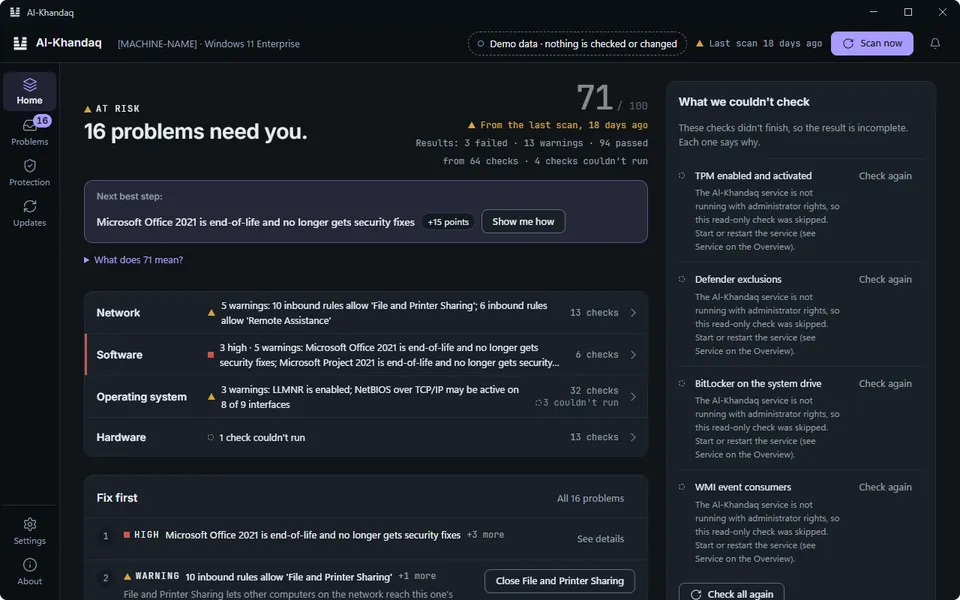
Screen 1 of 6. 01 Home
Is my computer safe? One answer.
A score out of 100, a verdict and the next step. And a plain list of what it couldn't check.
- 1One score, explained
- 2Says what it couldn't check
-
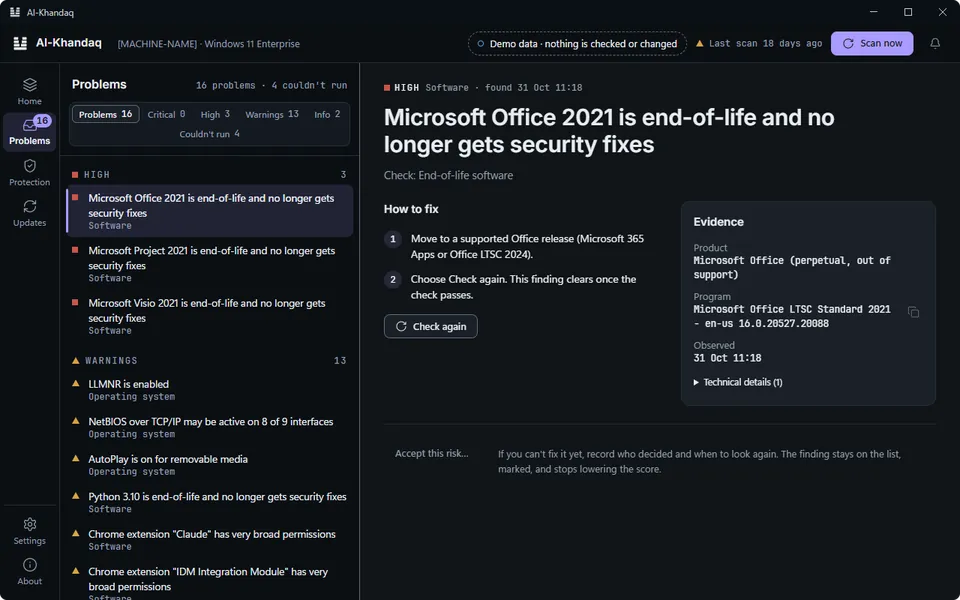
Screen 2 of 6. 02 Problems
Every problem, with proof.
What was found, why it matters, how to fix it, and the evidence. If you accept a risk, it records who decided and when.
- 1Steps in plain words
- 2Evidence, not guesses
-
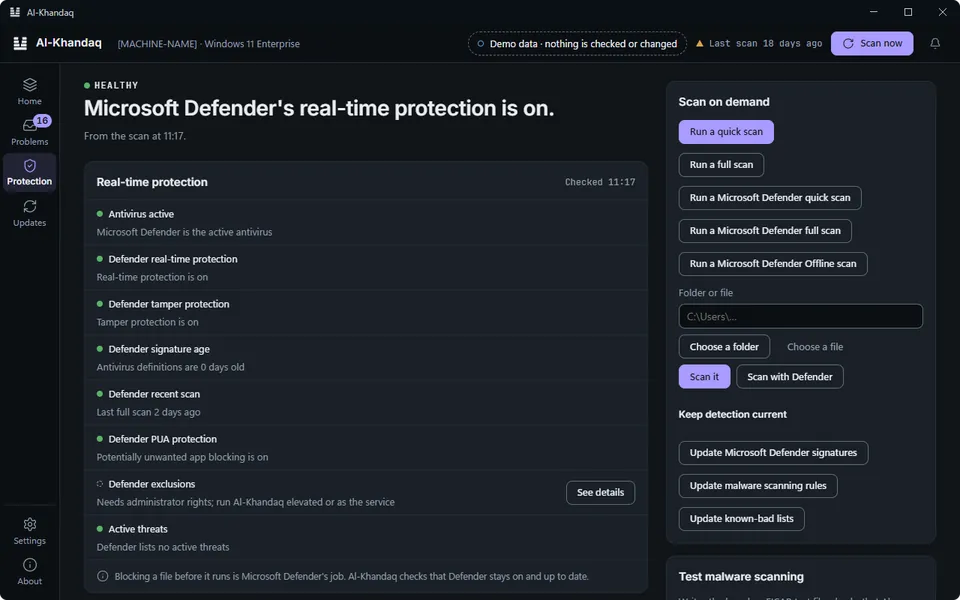
Screen 3 of 6. 03 Protection
Your antivirus, checked.
Microsoft Defender's real-time protection, signatures and exclusions. And a second-opinion malware scan when you want one.
- 1Scan when you choose
-
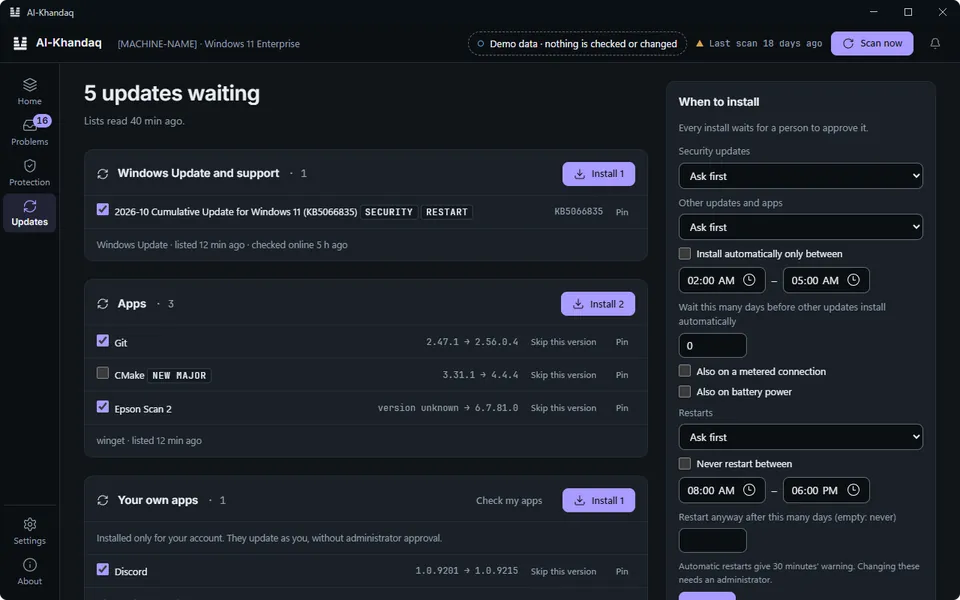
Screen 4 of 6. 04 Updates
Every update, in one list.
Windows Update and winget side by side. Tick what to install, read the plan, then approve it.
- 1Nothing installs until you approve
-
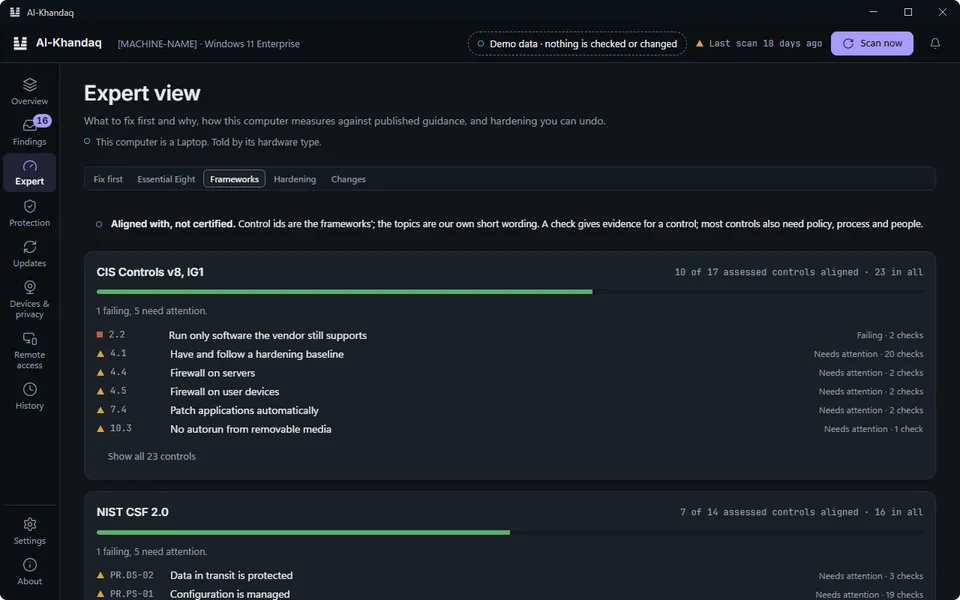
Screen 5 of 6. 05 Expert
For the people who ask “which control?”
Fix first, Essential Eight coverage and hardening profiles you can undo. For IT teams and auditors.
-
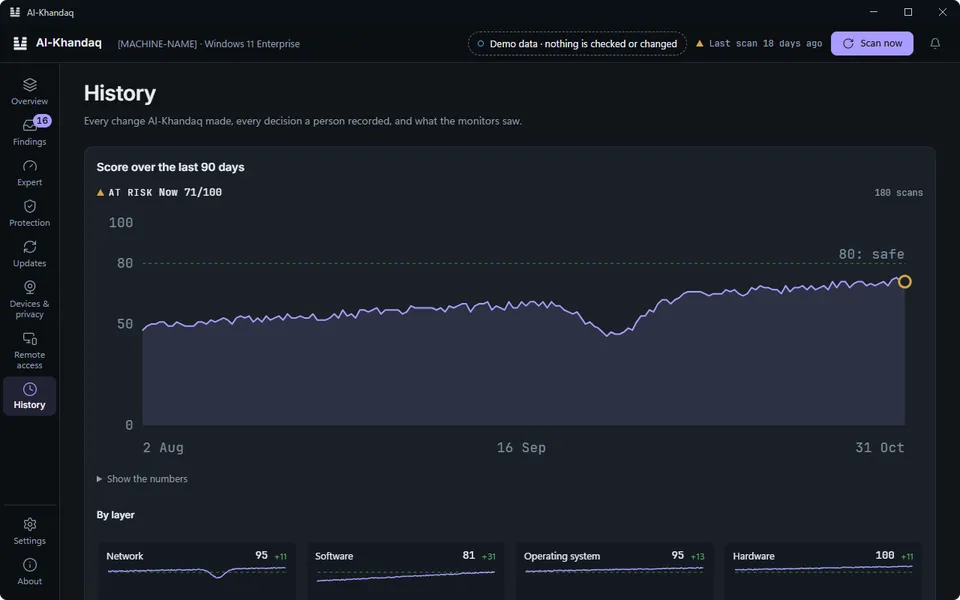
Screen 6 of 6. 06 History
Every change, on the record.
Each fix, who approved it and when. Each risk a person accepted. Everything the monitors saw. Kept on your computer.
Scan · 181 checks
Four gaps in the line.
A real scan of a Windows 11 laptop found one program with an exploited flaw and three open doors. Each one is a gap in the trench.
Score: 41 out of 100 → 76 out of 100.
- Update WinRAROne clickTo do
- Turn off LLMNRPart of a hardening profile you can undoTo do
- Close file sharing to other networksSteps you followTo do
- Forget the open Wi-Fi networkSteps you followTo do
Illustration based on a real scan, 13 Nov 2026. One-click fixes wait for approval. The plan says whether a fix can be undone.
Privacy
No telemetry. No crash reports. Every connection, listed.
Anything that sends data about your computer stays off until you turn it on. This website sets no cookies and has no tracking either.
On by defaultSends nothing about your computer
- Al-Khandaq updates
downloads.al-khandaq.com - Known exploited flaws (CISA)
www.cisa.gov - Vulnerable drivers list
www.loldrivers.io - Malware scanning rules, if none are installed
github.com - Windows Update and winget
the sources your computer already uses
Off until you turn it onWould send data about your computer
- National Vulnerability Database
services.nvd.nist.gov - OSV.dev, for Ubuntu packages
api.osv.dev - Pwned Passwords
api.pwnedpasswords.com - File hash lookup (CIRCL)
hashlookup.circl.lu - Your webhook or SIEM
set by your administrator
Free for personal use · Fixes included
Hold the line.
Version 1.0.2 · Windows 10, 11 and Server · macOS 11 or later · Ubuntu
Windows
Windows 10, 11 and Windows Server 2019 or later, 64-bit.
Download coming later.
macOS
macOS 11 Big Sur or later. One installer for Apple silicon and Intel Macs, with the app and the background service.
Download for MacSigned with Apple Developer ID and notarised by Apple.
Ubuntu
Ubuntu 22.04, 24.04 and 26.04, 64-bit. Packages for the agent and the desktop app.
Download coming later.